Choosing from the best photo printers for professionals means balancing color accuracy, print size, ink system, and running costs. The right model can save time in post-production and deliver consistent results across jobs.
Below, we focus on machines built for serious photography workflows, from compact desktop options to large-format printers for client-ready output.
Best 10 Photo Printers for Professionals Picks for 2026
Flagship 17-inch fine-art pick
Canon imagePROGRAF PRO-1100 17-inch

- 11 pigment inks with Chroma Optimizer
- 17-inch wide-format, print-only design
- Workflow tools for color and media control
Best For: Studio photographers and fine-art printing
Low-cost high-volume tank option

- Refillable tank system lowers ink costs
- 6-color ink set for photos and graphics
- All-in-one printing, scanning, and copying
Best For: Creators and small studios with high print volume
Classic 13x19 photo specialist
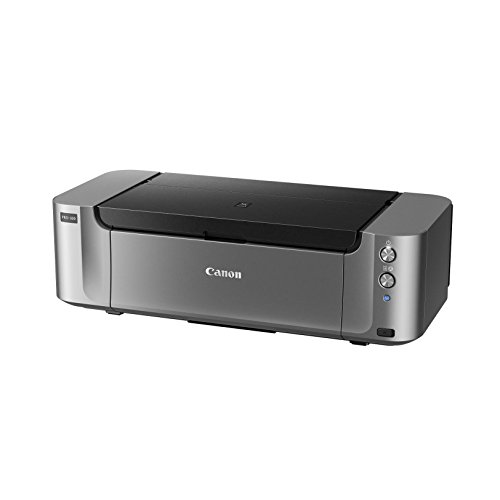
- 8 dye inks with 3 grayscale inks
- 4800 x 2400 dpi photo resolution
- Wireless printing with 13 x 19 support
Best For: Photographers printing color and black-and-white photos
24-inch large-format workhorse
Canon imagePROGRAF TM-240 24-inch

- 24-inch wide-format output up to Arch C
- Water-resistant inks for outdoor use
- Color calibration for consistent results
Best For: Studios and offices needing posters, signs, and large prints
Studio-Ready 13-inch Photo Printer

- 8-color dye ink for vivid photo output
- Borderless prints up to 13" x 19"
- 3.0-inch color LCD and fast print times
Best For: Photographers needing vibrant 13-inch prints and quick client proofs
Wide-Format Fine Art Printer
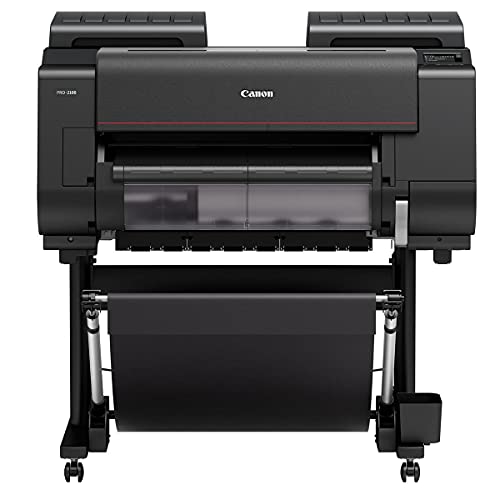
- 24-inch wide-format output up to 24 x 59 inches
- 12-ink system with Chroma Optimizer
- Built for professional photography, fine art, and design
Best For: Studios and printmakers needing large-format gallery prints
Gallery-Quality Pigment Printer

- 9-color pigment ink with Chroma Optimizer
- Matte Black ink for deeper blacks
- Anti-clogging system and 3.0-inch LCD
Best For: Photographers wanting compact pigment prints with strong tonal depth
Studio-Ready Dye Printer

- 8-color dye ink system for vivid color and tonal range
- Borderless prints up to 13x19 inches
- A3+ photo in as little as 90 seconds
Best For: Photographers and designers needing fast, vibrant desktop prints
Large-Format Fine Art Printer

- 11-color pigment system with 2400 x 1200 dpi resolution
- Prints up to 44 inches wide
- Color Density Sensor supports consistent calibration
Best For: Studios and print shops making wide-format photo prints
Archival Desktop Printer
Canon imagePROGRAF PRO-310 Bundle

- LUCIA PRO II pigment inks for permanence and deep blacks
- Borderless prints up to 13x19 inches
- Supports glossy and textured fine art media
Best For: Archival-minded photographers and fine art printers
Flagship 17-inch fine-art pick – Canon imagePROGRAF PRO-1100 17-inch
If you’re shopping for photo printers for professionals, the Canon imagePROGRAF PRO-1100 is built for gallery-style output with a 17-inch wide format and an 11 pigment-based ink system. It focuses on color accuracy, gloss uniformity, and workflow control, making it a strong choice when print quality matters more than speed.
Best For: Professional photographers and fine-art printers who want wide-format, pigment-based photo output.
Pros:
- 11 pigment-based inks plus Chroma Optimizer for richer gloss and reduced bronzing.
- LUCIA PRO II system is designed for broad color gamut, clarity, and darker shadow detail.
- Professional print and layout software plus media, color, and accounting management tools.
- Air feeding and anti-clogging features help support precise, consistent output.
Cons:
- Print-only design, so it doesn’t handle scanning or copying.
- Large 83-pound footprint makes it a serious studio device.
- Max media size tops out at 17 x 22 inches, so it isn’t for the biggest poster jobs.
Overall, the PRO-1100 is a premium choice for professionals who want careful tonal reproduction and controlled, high-end photo prints. It leans heavily into image quality and print workflow rather than convenience features.
Low-cost high-volume tank option – Epson EcoTank Photo ET-8550
The Epson EcoTank Photo ET-8550 is a practical fit for photo printers for professionals who also need to keep ink costs under control. Its cartridge-free tank system, 6-color inks, and wide-format support make it a flexible all-in-one for lab-quality photos and creative work.
Best For: Small studios and creatives who want affordable ink costs and wide-format printing.
Pros:
- Cartridge-free EcoTank system helps reduce ongoing ink replacement costs.
- 6-color Claria ET Premium inks are designed for vibrant photos and graphics.
- Prints 4 x 6 photos for about 4 cents each, according to Epson.
- All-in-one functions add scanning and copying in a single device.
Cons:
- Maximum media size is 13 x 19 inches, smaller than true 17-inch pro printers.
- Print resolution is lower than some dedicated photo-only competition in the list.
- Best suited to home or small-studio use rather than heavy production setups.
The ET-8550 stands out when you need professional-looking output without constant cartridge changes. It balances photo quality, versatility, and lower running costs better than most all-in-one photo printers.
Classic 13×19 photo specialist – Canon PIXMA PRO-100
The Canon PIXMA PRO-100 remains a strong option in photo printers for professionals who prefer vivid dye-based output and reliable 13 x 19-inch printing. Its 8-ink system is built for smooth gradients and dedicated grayscale support, which is useful for both color and black-and-white work.
Best For: Photographers who want a dependable 13 x 19-inch printer for detailed color and monochrome prints.
Pros:
- 8 dye-based inks deliver smooth gradients and strong color reproduction.
- Three grayscale inks help produce refined black-and-white prints.
- 4800 x 2400 dpi resolution supports detailed image output.
- Wireless connectivity and app control add convenient everyday use.
Cons:
- Manual duplexing and print-only speed make it unsuitable for office-style tasks.
- Maximum media size is 13 x 19 inches, so it is not a wide-format upgrade.
- Older model design compared with newer tank and pigment alternatives.
This is a good pick if you want a proven photo printer focused on image quality rather than extra multifunction features. It is especially appealing for photographers who still value dye-based color and strong monochrome performance.
24-inch large-format workhorse – Canon imagePROGRAF TM-240 24-inch
For photo printers for professionals who also produce posters and signage, the Canon imagePROGRAF TM-240 brings a 24-inch large-format platform with fast output and consistent color calibration. Its 5-color ink set and water-resistant formulation are aimed at sharp lines, outdoor displays, and repeatable results.
Best For: Offices and studios that need large-format prints, posters, and signage with consistent color.
Pros:
- 24-inch wide format handles large sheets up to Arch C size.
- L-COA PRO II processor and PF-06 printhead are built for speed and detail.
- Color calibration support helps keep output consistent across devices.
- UV and water-resistant inks suit outdoor job sites and poster displays.
Cons:
- More of a large-format office printer than a dedicated fine-art photo printer.
- Single-sheet capacity and one tray limit heavy production flexibility.
- Bulky 88.2-pound unit requires committed space.
The TM-240 is best viewed as a professional large-format printer that can handle photo work alongside signage and plan output. If your needs include consistent, durable prints in a bigger size, it fits that brief well.
Studio-Ready 13-inch Photo Printer – Canon PIXMA PRO-200S
If you want photo printers for professionals that can handle everything from small square prints to A3+ display work, the Canon PIXMA PRO-200S is built for a flexible studio workflow. Its 8-color dye ink system is aimed at vivid color output, and the printer supports borderless printing up to 13″ x 19″ with fast turnaround for common print sizes.
Best For: Professional photographers who need a compact 13-inch color printer for vibrant portfolio prints and client proofs.
Pros:
- 8-color dye-based ink system for vibrant, high-quality prints
- Borderless output from 3.5″ x 3.5″ up to 13″ x 19″
- Fast bordered print speeds, including 8″ x 10″ in 53 seconds
- 3.0-inch color LCD for checking ink levels and printer status
Cons:
- Print-only design, so it does not scan or copy
- Uses dye ink rather than pigment ink
- Maximum media size is listed as A4 in the details, which may be confusing alongside larger supported print sizes
The PIXMA PRO-200S is a strong pick if you value vivid color and a broad range of print sizes in a relatively compact pro photo printer. It suits photographers who want speed, flexibility, and easy status checks without moving up to a wide-format system.
Wide-Format Fine Art Printer – Canon PRO-2100 24-inch
For photo printers for professionals that are built around large-format output, the Canon PRO-2100 is geared toward serious photography, fine art, and graphic design work. It supports media up to 24 x 59 inches and uses a 12-ink system with Photo Black, Matte Black, grays, reds, blues, and Chroma Optimizer for detailed color and tonal control.
Best For: Studios and printmakers who need wide-format, gallery-oriented output with on-site warranty support.
Pros:
- 24-inch wide-format support for large prints up to 24 x 59 inches
- 12-ink set includes black, gray, red, blue, and Chroma Optimizer
- Designed for professional photography, fine art, and graphic design
- Includes a 1-year on-site warranty from Canon
Cons:
- Large physical footprint requires substantial studio space
- Print-only device with no scanning or copying functions
- Uses USB connectivity in the supplied details, so it is less flexible than wireless desktop models
The PRO-2100 makes sense when output size and tonal refinement matter more than compactness. If your work regularly goes beyond standard desktop sizes, this model is positioned as a dedicated wide-format production tool.
Gallery-Quality Pigment Printer – Canon imagePROGRAF PRO-310
If you are comparing photo printers for professionals and want a desktop model focused on gallery-style output, the Canon imagePROGRAF PRO-310 is built around a 9-color pigment system with Chroma Optimizer. Canon also highlights anti-clogging and skew correction features, plus a 3.0-inch color LCD for easier day-to-day operation.
Best For: Photographers who want a compact pigment printer for exhibition-quality color and improved black density.
Pros:
- 9-color plus Chroma Optimizer pigment system for gallery-quality prints
- Matte Black ink supports stronger black density and darker tones
- Anti-clogging system and skew correction help with productivity
- 3.0-inch color LCD makes status checks simple
Cons:
- Print-only design, so there is no scanning or copying
- Maximum output resolution is listed as 1200 x 1200 dpi in the supplied details
- Best suited to photo printing rather than mixed office tasks
The PRO-310 is a good fit if your priorities are tonal depth, gloss uniformity, and scratch resistance in a desktop footprint. It is especially appealing for photographers who prefer pigment-based prints and want a focused photo workflow.
Studio-Ready Dye Printer – Canon PIXMA PRO-200S Bundle
If you’re comparing photo printers for professionals, the Canon PIXMA PRO-200S is a strong pick for creators who want vivid color, fast turnaround, and a compact footprint. Its 8-color dye ink system is built for rich tonal range, and borderless printing up to 13×19 inches makes it easy to produce polished client prints, portfolio pieces, and fine art output without leaving the studio.
Best For: Photographers, artists, and designers who need vibrant color prints in a space-saving desktop format.
Pros:
- 8-color dye ink system delivers rich, vibrant output with strong tonal range.
- Borderless printing up to 13×19 inches supports gallery-style presentations.
- Fast A3+ photo printing can produce a full-size print in as little as 90 seconds.
- Professional Print & Layout software plus ICC profile support helps with screen-accurate color.
Cons:
- Print-only design means no copying or scanning functions.
- Uses dye ink rather than pigment ink for archival-focused workflows.
- Maximum sheet capacity is listed as 1, so high-volume feeding is limited.
For professional photo work where color impact and speed matter, the PRO-200S offers a practical balance of quality and convenience. It fits best when you need a compact printer that can still produce presentation-ready prints on demand.
Large-Format Fine Art Printer – Canon imagePROGRAF PRO-4100
Among photo printers for professionals, the Canon imagePROGRAF PRO-4100 is aimed at users who need very large output, dependable color, and a workflow built for high-volume production. With 11-color pigment printing, 44-inch wide output, and support for multiple connection options, it fits studios and production environments that regularly create exhibition prints, posters, and large-format artwork.
Best For: Professional studios and print shops producing wide-format photography and fine art work.
Pros:
- 11-color ink system and 2400 x 1200 dpi resolution support detailed, vibrant prints.
- Prints up to 44 inches wide for large-format photography and display work.
- L-COA PRO processing engine is designed for faster large-print workflows.
- Color Density Sensor helps maintain consistent color calibration.
Cons:
- Very large and heavy at 345 pounds, so it needs dedicated space.
- Designed for print-only use, with no scan or copy functions.
- More advanced than most desktop setups, so it’s best suited to professional environments.
If wide-format output is part of your professional workflow, the PRO-4100 offers the scale and color control needed for demanding projects. It is less about convenience and more about throughput, consistency, and size.
Archival Desktop Printer – Canon imagePROGRAF PRO-310 Bundle
For buyers focused on photo printers for professionals, the Canon imagePROGRAF PRO-310 is a compelling desktop option when archival quality and print control are the priority. Its LUCIA PRO II pigment ink system is designed for deep blacks and long-lasting color, while borderless printing up to 13×19 inches makes it practical for finished client pieces and fine art output.
Best For: Photographers and fine art creators who want archival pigment prints from a desktop printer.
Pros:
- LUCIA PRO II pigment inks are built for permanence and strong black density.
- Borderless output up to 13×19 inches supports ready-to-frame prints.
- Professional Print & Layout software and ICC profile support help with accurate color management.
- Works with a wide range of media, including glossy photo paper and textured fine art papers.
Cons:
- Print-only model, so it does not add scanning or copying functions.
- Maximum sheet capacity is 150, which is lower than heavier production machines.
- Best suited to image output rather than general office printing.
The PRO-310 is a smart fit if you want professional-looking prints with pigment-based longevity in a relatively compact form. It balances media flexibility and color control well for serious photography and fine art work.
How We Picked the Best Photo Printers for Professionals
We focused on print quality, ink technology, maximum media size, color consistency, connectivity, and total cost of ownership. For Photo Printers for Professionals, long-term reliability and predictable output matter as much as raw resolution.
Quick Comparison
Desktop models are best for studio proofing and smaller fine-art prints, while wide-format printers are the better fit for posters, exhibitions, and commercial work. Tank-based models can reduce ink costs, but pigment-based systems usually offer stronger archival performance and better resistance to fading.
Key Buying Factors for Photo Printers for Professionals
Print Size and Media Support
Choose a printer that matches your typical output. If you mainly produce 13-inch prints, a compact pro model may be enough. If you sell large art prints or need client display pieces, a 24-inch or 44-inch device offers far more flexibility.
Ink Type and Color Gamut
Pigment inks are usually preferred for archival work and gallery prints because they tend to offer better longevity. Dye-based systems can produce vibrant results and may be a good fit for photographers prioritizing vivid color and smooth gradients.
Ease of Use and Workflow
Look for reliable wireless printing, clear menus, media loading ease, and strong driver/software support. These details save time in busy studios and reduce wasted paper and ink.
Running Costs
Initial price is only part of the equation. Check ink cartridge yields, maintenance requirements, and the cost per print, especially if you print regularly or in volume.
Who Should Buy Which Photo Printers for Professionals?
Studio photographers and fine-art sellers should lean toward wide-format pigment printers for premium output and flexibility. Event and portrait studios may prefer a balanced desktop model that handles everyday client prints efficiently. If you print frequently and want lower ink costs, an EcoTank-style option can make sense. For large-format commercial or exhibition work, prioritize printers with broader media support and higher-capacity ink systems.
In short, the best choice depends on your print size, volume, and quality standards. Match those needs to the printer’s ink system and media capabilities, and you’ll end up with a more capable long-term tool.
