If you’re an artist looking to digitize your work, choosing the right large format scanner is essential. You need a device that captures every detail, from the finest brush strokes to the vibrant colors. With so many options available, it can be overwhelming. However, you’ll find that certain models stand out for their exceptional performance and features. Let’s explore the top picks that can enhance your creative process and guarantee your art is preserved in high resolution.
VIISAN VF3240 Large Format Flatbed Scanner

The VIISAN VF3240 Large Format Flatbed Scanner is perfect for artists who need high-quality scans of their work, whether it’s photographs, sketches, or large documents. With a scanning area of 297 × 420 mm and an optical resolution of 2400 DPI, you’ll capture every detail in stunning clarity. It scans at an impressive speed of just 4 seconds for color documents, thanks to its efficient Auto-Scan function. The frameless design and narrow boundary make it easy to use, while compatibility with Windows and MacOS guarantees seamless integration. Just keep in mind its limitations with 3D items and some document imperfections.
Best For: Artists and professionals seeking high-quality scans of photographs, sketches, and large documents.
Pros:
- Scans at a high optical resolution of 2400 DPI, capturing intricate details.
- Fast scanning speed of just 4 seconds for color documents enhances productivity.
- Compatible with both Windows and MacOS, providing versatile integration options.
Cons:
- Not suitable for scanning 3D items or documents that are not perfectly flat.
- Some users report issues with scan quality, including blurred areas on imperfect documents.
- Design flaws may restrict full scans of larger items, such as books, due to margins.
VIISAN Large Format Book & Document Scanner

For artists and creators dealing with oversized works, the VIISAN Large Format Book & Document Scanner (Model S21-V) stands out with its impressive A2/A3 capture size of 594×420 mm. With a resolution of 26MP and software-enhanced scanning up to 600 DPI, you can capture intricate details. This lightweight scanner, weighing just 2.2 pounds, is ideal for everything from large journals to 3D objects. It features intelligent scanning capabilities, including auto-flattening and edge repair, ensuring high-quality results. While the bundled software may need some manual adjustments, the built-in LED lighting enhances your scanning experience in any environment.
Best For: Artists and creators who need to scan large format works, such as journals, manuscripts, and 3D objects, with high detail and clarity.
Pros:
- High capture size of A2/A3 (594×420 mm) allows for versatile scanning of oversized items.
- Intelligent scanning features like auto-flattening and edge repair enhance the quality of scanned images.
- Built-in 3-level LED lighting provides clear photos even in low-light conditions.
Cons:
- Bundled software may require manual editing for optimal results, leading to potential user frustration.
- Mixed reviews regarding scan quality, with some users experiencing blurriness and alignment issues.
- Not compatible with ARM-based devices, limiting usability for certain users.
Epson Perfection V19 II Flatbed Scanner

Looking for a versatile scanner that can handle everything from artwork to documents? The Epson Perfection V19 II Flatbed Scanner is your ideal choice. With a stunning 4800 dpi optical resolution, you can create high-quality enlargements quickly. It’s USB powered, making it portable, and features a built-in kickstand for vertical placement. The high-rise lid accommodates bulky items like books. You’ll appreciate one-touch scanning, restoring faded photos with Easy Photo Fix technology, and generating searchable PDFs. Weighing just 3.1 pounds, it’s compact yet powerful, receiving a solid 4.2-star rating from users who praise its ease of use and image quality.
Best For: Those looking for a compact and versatile scanner suitable for photos, documents, and artwork with high-quality output.
Pros:
- High optical resolution of 4800 dpi, perfect for enlarging photos and artwork.
- USB powered for easy portability and convenience.
- One-touch scanning feature simplifies the scanning process for users.
Cons:
- Some users report installation difficulties that may require additional support.
- A few complaints about durability after light use, indicating potential longevity issues.
- Limited scanning speed may not meet the needs of users requiring high-volume scanning.
Plustek Wide-Format Color Duplex Document Scanner S30

Artists seeking a reliable solution for digitizing large documents will find the Plustek Wide-Format Color Duplex Document Scanner S30 particularly appealing. It scans up to 12 inches wide and 200 inches long, accommodating various document types like blueprints and standard paper. With a 100-sheet auto document feeder, you can streamline your workflow. Users appreciate its fast, accurate scanning, though some report color quality issues and software compatibility concerns, especially on Macs. Despite these limitations, it’s a solid choice for moderate use, especially if you’re looking for an affordable option to handle wider documents effectively.
Best For: Artists and professionals needing to digitize large documents efficiently and affordably.
Pros:
- Fast and accurate scanning capabilities, suitable for large document collections.
- 100-sheet auto document feeder streamlines the scanning process.
- Can handle various document types, including blueprints and fragile papers with carrier sheets.
Cons:
- Color quality may be inferior compared to competitors, requiring adjustments for optimal results.
- Software compatibility issues reported, particularly on Mac systems, with outdated drivers.
- Build quality concerns noted, including problems with the document holder and occasional paper jams.
Colortrac SmartLF 36-inch wide color scanner
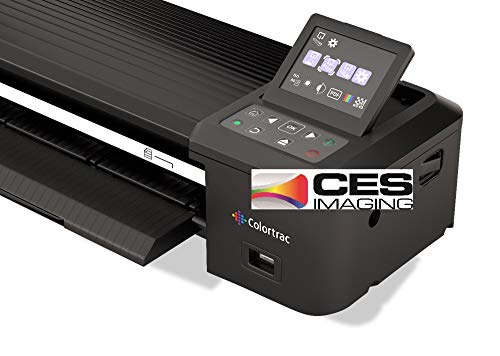
The Colortrac SmartLF 36-inch wide color scanner stands out as an exceptional choice for professionals needing high-quality large format scans. Weighing only 15.4 lbs, it’s portable and easy to transport in its durable wheeled carrying case. This self-contained scanner doesn’t require a PC, allowing you to scan directly to USB or cloud storage. With outstanding scan quality and speeds of 3 ips for color, it’s perfect for capturing intricate details. While some users reported initial setup challenges, the overall feedback highlights its ease of use and excellent value, making it a solid addition to your creative toolkit.
Best For: Professionals and creatives who require high-quality large format scans in a portable and easy-to-use device.
Pros:
- Excellent portability with a durable wheeled carrying case.
- High-quality scans with fast speeds of 3 ips for color and 4.5 ips for grayscale.
- Self-contained system that allows direct scanning to USB or cloud storage without needing a PC.
Cons:
- Initial setup and calibration can be challenging for some users.
- Some users experienced scan quality degradation over time.
- Lack of an included user manual and mixed feedback on customer support.
Plustek OpticSlim 1680 High Speed Large Format Flatbed Scanner

Plustek OpticSlim 1680 stands out as the ideal choice for artists needing a high-speed large format scanner. It scans tabloid-sized documents in just 3 seconds at 300dpi in gray mode or 5 seconds in color mode. With its one-key operation and intuitive interface, you’ll find it easy to adjust settings using the four pre-configured buttons. The dual view function allows you to quickly check image adjustments, ensuring your scans meet your creative vision. Plus, it’s TWAIN and ICA compliant, making it compatible with various software on Windows and Mac. Don’t forget to download the latest driver for peak performance!
Best For: Artists and professionals seeking a high-speed, large format scanner for quick and efficient scanning of tabloid-sized documents.
Pros:
- Fast scanning speeds: Scans tabloid-sized documents in just 3 seconds at 300dpi in gray mode and 5 seconds in color mode.
- User-friendly interface: One-key operation with intuitive controls makes it easy to adjust settings.
- Compatibility: TWAIN and ICA compliant, ensuring seamless integration with various software on both Windows and Mac systems.
Cons:
- Limited to tabloid size: Primarily designed for tabloid-sized documents, which may not meet the needs of users requiring different sizes.
- Potential driver issues: Users may need to download the latest drivers from the Plustek website for optimal performance.
- No wireless connectivity: Lacks wireless features, limiting placement options compared to some modern scanners.
VIISAN A3 Flatbed Scanner (3120)

Designed specifically for schools, libraries, and small offices, the VIISAN A3 Flatbed Scanner (3120) is an excellent choice for anyone needing to digitize large artworks or documents. With a maximum scan size of 11.7 x 16.7 inches and an impressive optical resolution of 1200 x 1200 dpi, your images will come out vibrant and detailed. It scans A3 color documents in just 8 seconds at 200 dpi, and the auto-scan function simplifies the process. Plus, its frameless design maximizes your scanning area. Compatible with both Windows and MacOS, it’s a versatile addition to your creative toolkit.
Best For: Schools, libraries, and small offices looking to digitize large artworks or documents efficiently.
Pros:
- Fast scanning speed: Scans A3 color documents in just 8 seconds at 200 dpi.
- High optical resolution: Delivers vibrant and detailed images with a 1200 x 1200 dpi resolution.
- User-friendly design: Features an auto-scan function and four-panel buttons for quick actions.
Cons:
- Limited to flat items: Not suitable for scanning three-dimensional items such as clothes or CDs.
- Driver limitations: WIA driver restricts scanning to 600 dpi due to Microsoft restrictions.
- Maintenance required: Cleaning is necessary if white lines appear during scanning.
Epson Perfection V850 Pro scanner

For artists seeking exceptional detail and versatility in their scanning projects, the Epson Perfection V850 Pro scanner stands out with its impressive 6400 dpi resolution. Its dual lens system optimizes results, whether you’re scanning slides, negatives, or thick books. With a Dmax of 4.0, you get smooth gradations and fine shadow detail. The scanner’s high-speed mode lets you work efficiently, handling 12 slides at once. While it may lack wireless capabilities, user feedback praises its durability and quality. Ideal for enthusiasts and semi-professionals, it’s especially useful for digitizing old photographs and negatives, ensuring you capture every detail.
Best For: The Epson Perfection V850 Pro scanner is best for enthusiasts and semi-professionals looking to digitize old photographs and negatives with exceptional detail and quality.
Pros:
- High resolution of 6400 dpi for outstanding image clarity.
- Dual lens system ensures optimal scanning results for various media types.
- Durable build quality with reports of long-term reliability.
Cons:
- Lacks wireless capabilities, limiting connectivity options.
- SilverFast software can be complex and challenging for some users.
- May not match the results of professional enlargers for tonal range.
Epson Perfection V600 Photo Color Scanner

If you’re an artist seeking to digitize your artwork or photography with exceptional detail, the Epson Perfection V600 Photo Scanner stands out as an ideal choice. With a maximum resolution of 6400 x 9600 dpi, you can create stunning enlargements up to 17 x 22 inches. Its built-in Transparency Unit allows you to scan multiple 35mm slides or negatives easily. The user-friendly design features four customizable buttons for quick access to scanning, copying, and PDF creation. Plus, with Epson’s ReadyScan LED technology, you’ll enjoy faster scans without warm-up time. This scanner is a powerful tool for preserving your creative legacy.
Best For: Artists and photographers looking to digitize slides, negatives, and prints with high-resolution detail.
Pros:
- High maximum resolution of 6400 x 9600 dpi for exceptional image quality.
- Built-in Transparency Unit for easy scanning of multiple 35mm slides or negatives.
- User-friendly with customizable buttons for quick scanning and efficient workflow.
Cons:
- Limited to 8.5 x 11.7 inches for photo and document scanning, which may not accommodate larger formats.
- Some users may find the software package complex to navigate.
- Connectivity limited to Hi-Speed USB 2.0, which may be slower than newer USB standards.
Epson Expression 13000XL Archival Photo and Graphics Flatbed Scanner

Artists seeking a high-quality solution for large-format scanning will find the Epson Expression 13000XL Archival Photo and Graphics Flatbed Scanner an excellent choice. This scanner accommodates reflective media up to 12.2 x 17.2 inches, perfect for photo archiving and graphic arts. With a resolution of 2400 x 4800 dpi and 3.8 Dmax optical density, it delivers sharp, vibrant images using Epson’s advanced technologies. Features like one-touch color restoration, automatic dust removal, and batch scanning streamline your workflow. Plus, the included SilverFast Ai software guarantees seamless integration with your favorite imaging tools, enhancing your creative process.
Best For: Artists and professionals in need of high-quality large-format scanning for photo archiving and graphic arts.
Pros:
- High resolution and optical density (2400 x 4800 dpi and 3.8 Dmax) for sharp, vibrant images.
- Efficient workflow features such as one-touch color restoration, automatic dust removal, and batch scanning capabilities.
- Comes with advanced SilverFast Ai software for seamless integration with various imaging tools.
Cons:
- Relatively heavy at 31.5 pounds, making it less portable.
- Customer ratings average at 3.7 out of 5 stars, indicating mixed feedback.
- Best sellers rank of #188,943 in Office Products suggests limited popularity compared to other scanners.
Factors to Consider When Choosing Large Format Scanners for Artists
When choosing a large format scanner, you need to contemplate several key factors. Think about the scanning resolution, document size compatibility, and how fast the scanner operates. Also, don’t overlook software integration and image quality features, as they can greatly influence your workflow and results.
Scanning Resolution Importance
While you may be tempted to choose a scanner based solely on price, the scanning resolution is one of the most important factors to take into account for artists. A higher resolution, like 2400 DPI, captures finer details and produces sharper images, making it ideal for high-quality reproductions. For professional-grade prints and enlargements, consider going for 4800 DPI or above. Higher optical resolutions enhance color accuracy and tonal gradation, vital for preserving the integrity of your artwork. On the other hand, scanning at lower resolutions, like 600 DPI, may limit detail, especially with large-format pieces. Keep in mind that higher resolutions create larger file sizes, so think about your storage and processing capabilities as you make your choice.
Document Size Compatibility
Selecting the right large format scanner involves understanding document size compatibility, which is essential for achieving ideal results. First, check the maximum scanning area; some scanners handle A2/A3 sizes (up to 594×420 mm), while others only support A3 or smaller. If you’re working with oversized documents, like maps or architectural drawings, look for scanners that accommodate widths up to 36 inches to avoid segmentation. Consider the types of media you’ll be scanning too—ensure the scanner can handle thick books, manuscripts, and even 3D items. Additionally, evaluate the optical resolution; higher DPI, like 2400 or 6400, captures finer details, enhancing reproduction quality. A design with a high-rise lid or frameless structure can also ease the scanning of bulky items.
Speed and Efficiency
Understanding document size compatibility sets the stage for considering speed and efficiency in large format scanners. Scanning speed is essential; many scanners can capture an A3-sized area in just 4 seconds at 200 DPI, boosting your workflow. Keep in mind that higher optical resolutions, like 6400 DPI, may extend processing times. Look for auto-scan features that allow continuous scanning without manual effort, saving you valuable time, especially when working on multiple pieces. Additionally, energy-efficient LED light sources eliminate warm-up times, enabling immediate scanning. Rapid capabilities, such as 10-second scans for letter-sized documents, help you quickly digitize artworks, facilitating faster project completion and revisions. Ultimately, choosing a scanner with ideal speed and efficiency can enhance your creative process considerably.
Software Integration Capabilities
When choosing a large format scanner, considering software integration capabilities can remarkably enhance your scanning experience. Look for scanners that support TWAIN or WIA drivers, as these enable seamless compatibility with various imaging applications. This can streamline your workflow, especially when you need to process scans quickly. Pay attention to advanced features like OCR and image enhancement tools, which can transform scanned documents into editable formats and improve usability. User feedback often emphasizes the importance of software stability and ease of use—avoid models bundled with clunky software that complicates post-processing. Finally, verify compatibility with both Windows and macOS, as restrictions on certain systems can limit functionality. Choosing wisely here can greatly boost your creative output.
Image Quality Features
To achieve the best results in your art scanning endeavors, it’s crucial to prioritize image quality features in a large format scanner. Look for scanners with high optical resolutions, such as 2400 x 2400 DPI or higher, to capture the intricate details of your artwork. A high color depth, like 48-bit, will give you a broader range of colors and smoother gradients. Make certain the scanner can handle various media types, including reflective surfaces, to guarantee you can digitize all your artistic works. Features like automatic dust removal and color restoration can greatly enhance image quality by minimizing imperfections. Finally, consider scanning speed; models that scan large formats quickly can boost your workflow efficiency, allowing you to digitize multiple pieces seamlessly.
User-Friendly Design
While focusing on image quality features is essential, the user-friendly design of a large format scanner can greatly enhance your overall experience. Look for scanners with intuitive interfaces and simple button layouts, so you can operate them easily without needing extensive technical knowledge. Features like auto-scan functions can streamline your workflow, allowing you to scan multiple documents quickly without manual adjustments. An ergonomic design is vital too; it should accommodate bulky items like books and large artworks, letting you scan without excessive manipulation. Finally, guarantee compatibility with various operating systems and straightforward installation processes, so integrating the scanner into your workflow is hassle-free. A user-friendly design can make a significant difference in your creative process.
Portability and Weight
Portability and weight are essential factors for artists choosing a large format scanner, especially if you plan to move it between studios or locations. Lighter models typically weigh between 2.2 to 3.1 pounds, making them easier to handle and transport. In contrast, heavier models—those over 20.6 pounds—can be cumbersome and require dedicated workspace, limiting your flexibility. Consider the scanner’s dimensions too; larger models may pose challenges for storage and transport. USB-powered options enhance portability, allowing you to work without a bulky power supply. Look for a scanner with a built-in carrying case or a compact design to protect your equipment and simplify movement. Choosing the right balance of portability and weight guarantees you can create wherever inspiration strikes.
